
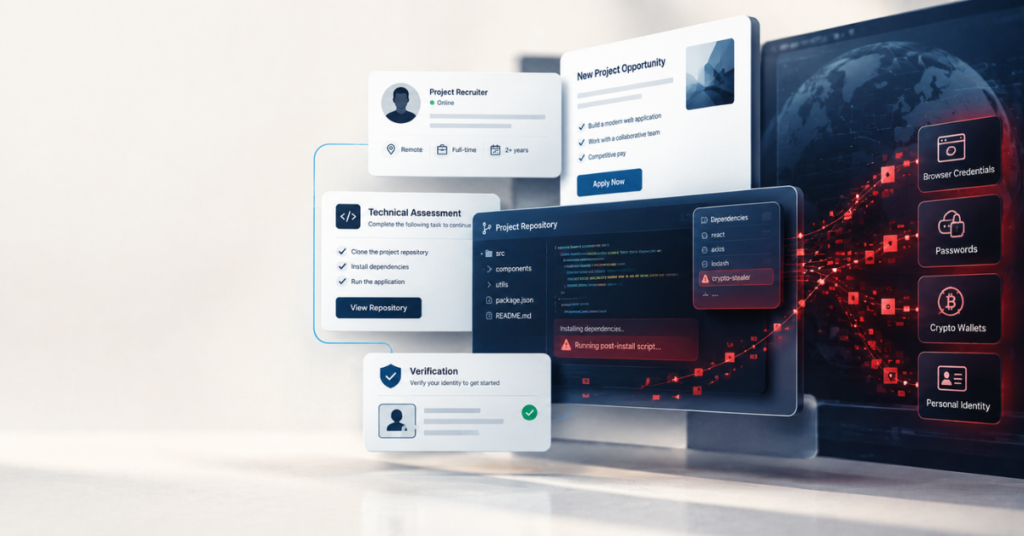
Since late 2023, security researchers at ESET, Microsoft, Palo Alto Networks (Unit 42), and Socket have independently tracked an ongoing campaign, attributed to North Korean state-sponsored actors and known under several names, including Contagious Interview and Deceptive Development (Microsoft), that does one specific thing: it poses as recruiters on LinkedIn and freelance job-hunting sites, sends convincing job descriptions to freelance developers, and delivers a “coding test” or take-home assignment that’s actually a delivery mechanism for malware.
In an October 2025 investigation, Socket identified 338 malicious npm packages tied to the campaign and reported more than 50,000 downloads, while its ongoing tracking has since identified substantially more malicious packages and continued activity (Socket). The malware families involved, BeaverTail, InvisibleFerret, and a newer variant called OtterCookie, are built specifically to steal browser-stored credentials, cryptocurrency wallet data, and password manager contents.
No independently verified dollar figure is tied to this specific campaign’s proceeds. But it operates within a much larger pattern of North Korean cyber-enabled theft. Chainalysis estimates that North Korea-linked hackers stole about $1.34 billion in cryptocurrency in 2024 and $2.02 billion in 2025. Those figures cover a broad range of operations and should not be attributed to Contagious Interview specifically.
This isn’t a cautionary tale about a rare, exotic threat. It’s a real, active, well-funded operation targeting the exact moment in freelance work when trust is lowest, and eagerness is highest: the onboarding stage, before a working relationship has been established. This article walks through that entire sequence, stage by stage, because the individual pieces (a premature information request, a “test project,” a rushed verification call) look far less alarming in isolation than they do laid out end to end.
Table of Contents
Why Client Onboarding Creates a Unique Risk
Every other article in this cluster deals with risk inside an existing, at least somewhat verified relationship: a payment platform you already use, a client you’re already working with, paperwork for a contract already signed. Onboarding is different because none of that verification exists yet. You don’t know if the “recruiter” is real. You don’t know if the company is real. And you’re often motivated to move quickly, because a new project is attractive and freelance income is rarely so steady that turning down a promising lead feels easy.
That combination, low verification, high motivation to proceed, is exactly the condition scams like Contagious Interview are built around. The campaign’s documented pattern relies on convincing, scripted outreach and fabricated company personas because it targets people in exactly this state: job-hunting, freelancing, and inclined to give a promising opportunity the benefit of the doubt.
Legitimate Test Assignment vs Malicious One
This is the single most useful distinction in this entire article, because a take-home coding test or trial assignment is completely normal in freelance work. The risk isn’t the existence of a test, it’s the specific details about how it’s delivered and what it asks you to do.
| Problems | Legitimate Test Assignment | Malicious Pattern (Documented) |
| Where it’s hosted | A scoped assignment where you can review the materials and decide what code, dependencies, or commands will run before executing them. | A repository or package you’re pressured to clone, install, or execute without adequate review. |
| What it asks you to do | Complete a scoped task using your own normal setup | Clone and run unfamiliar code, often with instructions to run it outside any sandboxed or containerized environment |
| Pressure to turn off security tools | No legitimate assessment should require you to weaken or bypass your security controls simply to complete it. | Sometimes present, a request to turn off antivirus or ignore a security warning, framed as a false positive |
| Verification pressure | None, a real company doesn’t mind you taking time to verify who they are | Urgency to complete the assignment quickly, sometimes while screen-sharing on a live call |
| Recruiter’s digital footprint | Verifiable employment history, mutual connections, a real company with an actual online presence | A LinkedIn profile and company presence that looks professional at a glance but doesn’t hold up to independent verification |
This is IdentityBastion’s practical filter, drawn directly from the documented pattern researchers have tracked in this exact campaign, not a formal classification, but a specific, evidence-based way to evaluate a test assignment before running anything on your own machine.
The Onboarding Scam Sequence, Stage by Stage
Stage 1: The Initial Contact and the Pitch
It typically starts with a message that looks like routine recruiting outreach, a LinkedIn message, a message through a freelance platform, or a cold email referencing a job posting. Researchers tracking this campaign describe the outreach as scripted and consistent across a large number of fake personas, meaning the same general pitch gets reused with minor variations across hundreds of fabricated recruiter identities (Microsoft).
The description is often generic enough to feel plausible for a wide range of freelancers, a well-paying project, a flexible schedule, a company that seems to check out at a glance.
Stage 2: Premature Requests for Personal or Financial Information
Some variations of onboarding scams, not necessarily this specific campaign, which is focused on malware delivery, move straight into requesting sensitive paperwork before any real vetting has occurred. We’ve covered this in detail elsewhere: the timing and delivery-method red flags for a premature W-9 request are covered in our W-9 guide, and the specific red flags around ID and passport requests from overseas contacts are covered in our guide to overseas client risk.
The general rule holds across both: A legitimate request for sensitive information should have a clear business or tax purpose, come from a verifiable party, and use an appropriate method of transmission. A request that arrives before you’ve independently verified the client deserves extra scrutiny.
Stage 3: The Malicious “Test Project” or Contract
This is where the documented campaign does its real work, and it’s worth understanding the mechanism precisely because the same basic pattern, a file or link you’re pressured to open or run, shows up in less sophisticated versions aimed at non-developers too.
In the technical version, the “recruiter” sends a coding assignment or take-home test, often shared as a link to a project hosted on GitHub, GitLab, or Bitbucket. Buried inside the project are malicious npm packages, some of them typosquatting or mimicking the names of legitimate, trusted libraries to avoid raising suspicion during a quick glance at the code.
The victim is instructed to clone the project and run it, frequently with specific pressure to do so outside any sandboxed or containerized environment, sometimes while screen-sharing on a video call with the “interviewer” watching in real time, a detail that adds urgency and social pressure while also letting the attacker confirm the payload executed successfully.
Once run, the package fetches malware such as BeaverTail (an initial-stage stealer) or triggers a follow-on backdoor like InvisibleFerret. BeaverTail and InvisibleFerret can steal sensitive information including browser credentials and cryptocurrency-related data, while InvisibleFerret also provides remote-control and broader data-exfiltration capabilities. Newer variants use heavier obfuscation specifically to evade both static analysis and antivirus detection.
For freelancers outside software development, the same basic mechanism shows up in less technical form: a “contract” sent as a document with macros that need to be “enabled to view,” a fake e-signature link mimicking a legitimate platform like DocuSign, or a shared file requiring a plugin or viewer download before it will open. The underlying logic is identical, get the target to run or open something they wouldn’t otherwise trust, using the cover of a legitimate business process to lower their guard.
Stage 4: The Verification Call and Its Red Flags
A live call is useful evidence, but it should not be your only verification method. But it’s worth knowing what a scripted or fraudulent version of this step tends to look like, since scammers running sophisticated operations know a call adds legitimacy and have adapted accordingly.
Watch for: refusal to turn on video at all, citing a vague technical excuse; a video call where the background is generic or clearly staged rather than an identifiable real workspace; responses to specific, unscripted follow-up questions that feel oddly generic or slightly off-topic; and a consistent unwillingness to slow down or answer questions about the company’s actual operations in any real detail.
It’s also worth flagging, as covered in our guide to current identity theft scams, that AI-generated and cloned voices can make impersonation harder to detect, so a convincing voice or video call should not be treated as proof of identity on its own.
Stage 5: The Financial Extraction
This is a broader onboarding-scam pattern rather than a defining feature of the documented Contagious Interview campaign. This stage often takes the shape of the overpayment scam covered in depth in our guide to fraud vs. identity theft for freelancers, a “client” who overpays and requests a refund of the difference before the original payment actually clears. In the malware-focused version of this scam, this stage may not exist at all; the objective was already achieved the moment the malicious package executed.
Stage 6: Disappearance
Once the objective is achieved, the attacker may abandon the recruiter identity, delete or repurpose the account, or simply stop responding once the intended objective has been achieved. Messages stop, the LinkedIn profile may be deleted or repurposed for the next target, and by the time the victim realizes something is wrong, there’s often no active line of contact left to pursue.
What’s Actually at Risk, Mapped to Exposure
Different stages of this sequence expose different things, which is where the IdentityBastion Exposure Framework is useful for triaging what happened to you specifically. A premature information request (Stage 2) risks Tier 1 exposure if you actually provide an SSN or EIN.
The malicious test project (Stage 3) risks something the framework doesn’t fully capture on its own, direct compromise of your machine, which can expose Tier 1 and Tier 2 information simultaneously, since an infostealer doesn’t discriminate between a saved password and a saved SSN if both happen to be stored somewhere on the compromised system.
What Actually Protects You, and What It Doesn’t
| Protection | Solves | Doesn’t Solve |
| Running any unfamiliar test code only inside a sandboxed or virtual environment, never directly on your primary machine | Contains a malicious package to an isolated environment instead of your real system | Doesn’t help if you’re pressured into skipping the sandbox, which is precisely what this campaign’s instructions ask for |
| Refusing to disable antivirus or ignore security warnings, regardless of the excuse given | Provides an additional detection and blocking layer against malware. | Doesn’t protect against malware sophisticated enough to evade detection entirely |
| Verifying a company and recruiter independently before running or opening anything they send | Filters out a meaningful share of fabricated personas before you’re ever exposed to the payload | Doesn’t guarantee success against a well-constructed fake persona with a convincing digital footprint |
| Keeping all communication and file-sharing on the platform’s official channels rather than moving to personal email or chat apps | Keeps the conversation within the platform’s documented communication system and can make later review easier. | Doesn’t prevent a scammer from initiating contact through the platform’s own messaging in the first place |
| Treating a rushed video-call verification as a good sign, not a guarantee | Reduces overconfidence in a single verification method | Doesn’t substitute for the other checks, no single step here is sufficient alone |
Common Identity Theft Mistakes During Client Onboarding
Running an unfamiliar test project directly on your main work machine. This is the single mistake the entire documented campaign is built around exploiting, the instructions specifically push targets away from any sandboxed environment precisely because it works.
Disabling security software because “the client said it’s a false positive.” A legitimate technical assessment has no reason to require you to weaken your own machine’s defenses to complete it.
Treating a professional-looking LinkedIn profile as sufficient verification on its own. Fabricated personas in documented campaigns like this one are built with real care, a believable profile picture, plausible work history, and a company page are not difficult for a well-resourced operation to construct (Unit 42).
Moving communication off the platform too early, before any real vetting has occurred, losing the platform’s own record-keeping and any protection its dispute processes might otherwise offer.
Assuming a friendly, responsive “recruiter” reduces the likelihood of a scam. Documented social engineering in this space specifically optimizes for warmth and responsiveness, since it’s what lowers a target’s guard fastest.
FAQs: Identity Theft During Client Onboarding
Is It Safe to Complete a Coding Test for a Potential Freelance Client?
Often yes, but run any unfamiliar code in a sandboxed or virtual environment rather than directly on your main machine, and be especially cautious if you’re specifically instructed to skip that step or to run the code while screen-sharing under time pressure.
How Do I Know if a Recruiter or Client Contacting Me About Freelance Work Is Real?
Verify independently, check the company’s actual website and employee history beyond the LinkedIn profile itself, and treat a request to bypass normal verification or move quickly as a reason to slow down rather than speed up.
What Malware Is Actually Used in These Onboarding Scams?
Security researchers tracking the most prominent documented campaign have identified multiple malware families, including BeaverTail, InvisibleFerret, and OtterCookie, designed to steal browser-saved credentials, password manager data, and cryptocurrency wallet information from compromised machines.
Does This Only Affect Software Developers?
The most extensively documented version of this campaign specifically targets developers through coding tests, but the underlying mechanism, a file or link you’re pressured to open or run under the cover of a legitimate business process, applies to any freelancer, regardless of field, sent an unfamiliar document or link during onboarding.
What Should I Do if I Think I Ran a Malicious Test Project or Opened a Malicious File?
Disconnect the affected machine from the internet, change passwords for any accounts that were logged in or saved on that device from a separate, uncompromised device, and treat any exposed financial or cryptocurrency accounts as compromised until you’ve confirmed otherwise.
Conclusion: How Identity Theft Happens During Client Onboarding
Client onboarding can be one of the most difficult stages to evaluate because you’re making decisions before you’ve built much history or trust with the other party. Which is exactly why a well-documented, years-long, actively evolving campaign has built its entire operation around exploiting precisely that moment.
None of the individual red flags here are exotic: an unfamiliar file, pressure to skip a normal precaution, a rushed verification call. What makes this dangerous is how ordinary each step feels in isolation, and how differently it reads once you see the full sequence laid out.
The single highest-leverage habit from everything above: never run unfamiliar code or open an unfamiliar file from a new contact on your primary machine, and never disable your own security tools because someone else asked you to.
What to Do Next
The vulnerabilities that make onboarding risky don’t disappear once a project actually starts, they just take a different shape, especially for freelancers working through ongoing contractor arrangements or employer-of-record platforms rather than one-off projects. Our guide covers what changes.
Pingback: Identity Theft and Freelance Payment Platforms: Real Risks